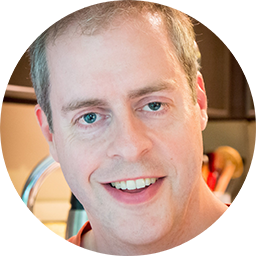
I have been working on software since 1991. I was running Web servers on Solaris and Linux in the mid-90s at the Vanderbilt University Medical Center, worked on FreeBSD systems for my first two years at Microsoft, and have been deeply involved with the .NET Framework and C# since 2001 and PowerShell since it was just an internal project called Monad. I worked on WinFS; the SQL data access clients; Entity Framework and OData; and the various XML stacks. I was deeply involved in rebuilding SQL's engineering system to handle the transition from on-premise software to Azure. At Sitecore, I migrated over 100 different project instances onto TFS and Git and automated many processes with PowerShell.
I have either been a software developer or had developers as my primary customers throughout my career. I have been an individual contributor, a team lead, and a manager of managers. I have designed, implemented, and tested features and systems and have managed project deliveries and software release, both in the box and to the Web. Thanks to this diverse experience, I understand the roles of all team members in a way that few do.
If you would like help with your software project or just want to talk about the practice of software engineering, contact me through any one of the services at the top of the page.

Lorem ipsum dolor sit amet, consectetur adipisicing elit. Mollitia neque assumenda ipsam nihil, molestias magnam, recusandae quos quis inventore quisquam velit asperiores, vitae? Reprehenderit soluta, eos quod consequuntur itaque. Nam.
Close Project
Lorem ipsum dolor sit amet, consectetur adipisicing elit. Mollitia neque assumenda ipsam nihil, molestias magnam, recusandae quos quis inventore quisquam velit asperiores, vitae? Reprehenderit soluta, eos quod consequuntur itaque. Nam.
Close Project
Lorem ipsum dolor sit amet, consectetur adipisicing elit. Mollitia neque assumenda ipsam nihil, molestias magnam, recusandae quos quis inventore quisquam velit asperiores, vitae? Reprehenderit soluta, eos quod consequuntur itaque. Nam.
Close Project
Lorem ipsum dolor sit amet, consectetur adipisicing elit. Mollitia neque assumenda ipsam nihil, molestias magnam, recusandae quos quis inventore quisquam velit asperiores, vitae? Reprehenderit soluta, eos quod consequuntur itaque. Nam.
Close Project
Lorem ipsum dolor sit amet, consectetur adipisicing elit. Mollitia neque assumenda ipsam nihil, molestias magnam, recusandae quos quis inventore quisquam velit asperiores, vitae? Reprehenderit soluta, eos quod consequuntur itaque. Nam.
Close Project
Lorem ipsum dolor sit amet, consectetur adipisicing elit. Mollitia neque assumenda ipsam nihil, molestias magnam, recusandae quos quis inventore quisquam velit asperiores, vitae? Reprehenderit soluta, eos quod consequuntur itaque. Nam.
Close Project